Elevate Your Stationery with Silver Wedding Dividers
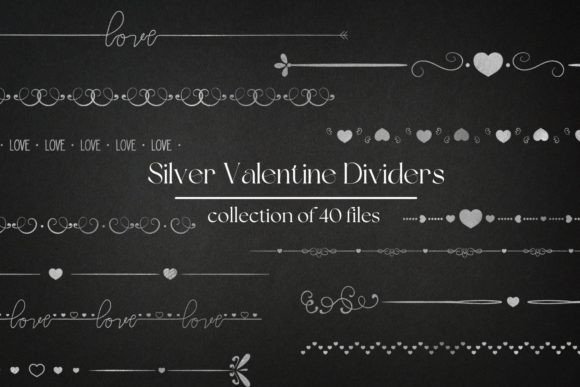
There is a distinct moment in the design process where a project shifts from looking "assembled" to looking "finished." It rarely happens because of a massive overhaul; instead, it usually comes down to the subtle details that guide the viewer's eye. For those of us working on wedding invitations, event signage, or even high-end branding, that finishing touch is often found in the borders and separators. If you have been searching for that specific metallic elegance without the hassle of complex Photoshop effects, let’s look at a versatile resource that can transform your layout instantly: Wedding Dividers, Silver Dividers.
These assets are not just generic lines; they are designed to mimic the reflective, cool-toned luxury of real silver. Whether you are a graphic designer finalizing a suite for a bride and groom, or a crafter setting up a print-on-demand store, having a library of 40 distinct elements is a significant advantage. The collection provides a variety of ornate and modern styles, ensuring you have the right "frame" for any typography or imagery you are working with.
The Versatility of Metallic Design Assets
One of the biggest challenges in design is maintaining a consistent aesthetic across different mediums. You might start with a concept on a computer screen, but the end goal is often a physical object. Because these dividers are provided in high-resolution PNG format (300 DPI) with a transparent background, they bridge the gap between digital and print perfectly. You don't need to worry about white box artifacts ruining your design on a dark background, and the file size (1900px by 120px) is substantial enough for large-format printing.
Let’s break down how this specific set of silver wedding dividers can be applied to real-world projects:
- Wedding Stationery & Invitations: This is the most obvious application, but it is worth emphasizing. Silver pairs beautifully with deep navy, charcoal, blush pink, and crisp white. Use these dividers to separate the "Date" from the "Venue" details, or as a footer element to ground the text block.
- Merchandise and Apparel: The files are optimized for direct-to-garment printing. Imagine a tote bag or a t-shirt for a bachelorette party where the text is framed by two symmetrical silver filigree ends. It adds a layer of perceived value to the product.
- Digital Branding and Social Media: In the age of Instagram and Pinterest, visual consistency is king. You can use these silver accents in your Instagram Stories to frame quotes or announcements. For a luxury blog or a jewelry brand, these elements can serve as consistent header decorations, building brand recognition over time.
- Packaging Design: If you sell physical products, packaging is your silent salesperson. Wrapping a box in kraft paper and adding a printed belly band featuring these silver dividers can instantly elevate a budget product to a premium gift.
Integrating Silver into Your Brand Identity
When we talk about brand identity, we are talking about the emotional response a customer has to your visuals. Silver conveys modernity, sleekness, and sophistication. Unlike gold, which can sometimes feel traditional or overly opulent, silver often feels more industrial, futuristic, or minimalist depending on how it is used.
If you are a small business owner in the beauty, tech, or fashion industry, incorporating these Wedding Dividers into your marketing assets can help position your brand as high-end. However, the key to success lies in restraint. A common mistake is overusing decorative elements. The goal is to use these dividers to create negative space and breathing room for your content, rather than cluttering the layout.
Consider the typography you are pairing with these assets. Because the dividers are ornate, they often pair best with clean sans-serif fonts (like Helvetica, Montserrat, or Open Sans) for the body text. This creates a necessary contrast. If you use a highly decorative script font and ornate silver borders, the design can become illegible. By keeping your main text simple, the silver accents become a feature rather than a distraction, improving overall readability and professional presentation.
Practical Tips for Font Pairing and Layout
Since you are working with decorative borders, the layout of your text requires careful thought. Here are a few practical observations from a designer’s perspective to help you get the most out of this asset pack:
- Alignment Matters: These dividers are horizontal elements. Ensure that they are center-aligned with your text block. If you are using them as a "corner" piece (by rotating the element), make sure the margins are mathematically equal on all sides of the document to avoid a lopsided look.
- Color Coordination: While the files are silver, digital silver is often just a specific shade of grey with highlights. Ensure your background color has enough contrast. A mid-tone grey background might wash out the silver details. Stick to high-contrast pairings: dark backgrounds for a dramatic look, or light backgrounds for an airy, ethereal feel.
- Scaling: Because the files are 1900px wide, they are scalable. However, if you shrink them down significantly for a business card, ensure the intricate details don't blur. Always view your design at 100% zoom (actual print size) to verify the lines are crisp.
- Layering for Depth: Don't be afraid to layer these PNGs. You can place a text box on top of a divider if you lower the opacity of the divider, or you can use two dividers to create a "frame" around a central image. This technique works exceptionally well for editorial design and magazine layouts.
Streamlining Your Workflow with Ready-Made Elements
For the entrepreneur or content creator, time is money. Creating these types of metallic textures and ornate vectors from scratch is time-consuming. It requires advanced knowledge of vector software and texture mapping. By using a pre-made set of silver wedding dividers, you are essentially buying back hours of production time.
This efficiency allows you to focus on the core message of your project. Instead of fussing over the bezier curves of a flourish, you can focus on the copywriting, the product photography, or the client relationship. It is a practical design asset that serves a specific function: making your work look polished without requiring a steep learning curve.
Whether you are creating a digital product to sell on Etsy, designing a menu for a high-end restaurant, or simply making a personal card for a loved one, these elements provide a ready-made solution for adding a touch of luxury. The versatility of the transparent PNG format means they are ready to drag and drop into Canva, Photoshop, Illustrator, or Procreate immediately.
Thank you for taking the time to explore how these assets can fit into your creative toolkit. We hope this collection inspires you to create something beautiful and helps streamline your design process. Happy creating!